 aisma
aisma
Real Aisma edit
One hand. Three products.
One 10-second take, edited three times, each time from a single product photo.
Example requestswap the bottle for the blue one in the photo
AI PRODUCT SWAP FOR VIDEO
A product swap replaces the product in a video you already shot with the one in your photo. Upload a 2–60 second clip and a product photo, say what to replace, and Aisma returns the same take with your product in place.
Paid editing · MP4 or MOV · 2–60 seconds · Review credits before generating.
One hand. Three products.
One 10-second take, edited three times, each time from a single product photo.
Example requestswap the bottle for the blue one in the photo
What stays
What changes
What you bring
Your clip + one photo per product
MORE PRODUCT SWAPS
A foot steps down and pivots on the heel. Two edits gave it a new sneaker, each from one product photo.

Architecture, one step.change the sneaker to the one in the photo
Examples marked Previous version were recorded with a previous version of Aisma. Results vary with your clip and request.
WHAT CHANGED, WHAT STAYED
The bottles start from one 10-second vertical take of a hand turning a clear perfume bottle. The sneaker starts from a 10-second horizontal take of a foot in a gray knit sneaker. The black bottle swap has its own page, with the product photo and the brief.
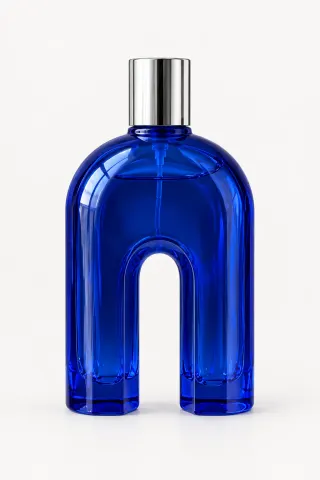
Cobalt
Example request
swap the bottle for the blue one in the photo
The grip and the quarter turn stay. When the hand turns it edge-on, the arch narrows to a slim blue profile, and the bedroom behind the hand doesn’t change.
Black
Example request
swap the bottle for the black one from the photo
A tall black cylinder with a gold cap and base ring. It stays round through the whole turn, held the way the original bottle was.
Blush
Example request
change the bottle to the pink one from the photo
Faceted sides and a clear faceted cap, with the same grip and the same timing as the original take.
Lattice sole · Previous version
Example request
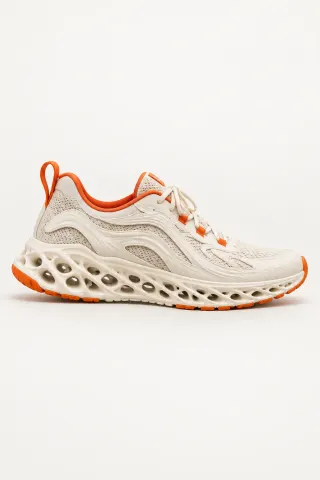
change the sneaker to the one in the photo
A cream sneaker with orange trim and an open lattice sole lands and pivots like the original. The olive pants, the rug and the chair legs stay as filmed.
HOW IT WORKS
MP4 or MOV, 2–60 seconds, up to 500 MB. Your original framing is kept.
One clean photo per product, then a line such as “swap the bottle for the black one from the photo.”
Pick 720p or 1080p. Aisma shows the credits first, and the finished edit arrives in your private Library.
REQUEST IDEAS
Name the thing to replace and the photo it should match. If something must stay put, add it.
Etsy candle shop
swap the amber jar for the sage green one in Photo 1 and keep the lit wick
Amazon listing video
replace the steel water bottle with the matte green one in the photo
TikTok Shop skincare clip
swap the dropper bottle in her hand for the frosted one in Photo 1, keep her manicure
Holiday version of a Shopify ad
swap the gift box on the table for the red holiday edition in the photo
Realtor walkthrough
replace the fruit bowl on the kitchen island with the vase of white tulips in the photo
Two photos of one product
swap the tumbler for the one in Photo 1; Photo 2 shows its back
Selling apparel instead? Our clothes changer puts a garment from a photo on the person in your clip.
PRODUCT SWAP SPECS
WHAT IT COSTS
A FEW GOOD QUESTIONS
Upload the clip, add a clean photo of the new product and name what to replace, as in “change the bottle to the pink one from the photo.” Use a second sentence for anything that must stay put, like the hand or the label side facing the camera. Then pick 720p or 1080p and generate once you’ve seen the credits. More plain-language examples are on our page about editing with a prompt.
Clips where the product stays easy to see. Our bottle take is a good model: one continuous 10-second shot, a steady hand, even light and the bottle in view the whole time, even edge-on. If a hand hides most of the product or it blurs past, pick a cleaner take. Moving products work too, like the sneaker above.
Yes, one edit per product, no reshoot. The three bottles at the top of this page are separate edits of the same 10-second take, each with its own photo and price. Every version keeps the original length and timing, so captions and music you add later line up across all of them. Recreate in your Library reopens the clip for the next version without a new upload.
Not always. In our examples the shapes and finishes came through clearly, down to the gold cap and the frosted facets. Small lettering and detailed labels can come out different from your photo, so watch the result at full size before it runs as an ad. If one part drifts, use Edit a clip to redo just that part; its price shows before it runs.
No. Aisma keeps your original audio, so narration and music stay as recorded while the picture changes. If your voiceover names the old product or its color, the words won’t match the new one. Pick a take where it isn’t named, or re-record that line in your usual editor.
It’s 8 credits per second at 720p, or 16 at 1080p, so a 10-second clip shot in one take comes to 80 credits at 720p. Each product version is its own edit. Shots are counted in whole seconds with a 2-second minimum each, so a clip with many quick cuts costs a little more. You see the total before you generate, and credits for a part that fails go back to your balance.
Aisma starts from a video you already shot; that’s what video to video editing means. Film a few seconds of the product on your phone and Aisma changes it from there. Making product videos from photos alone is on our roadmap. If that’s what you need, tell us about your project at support@aisma.ai.
Close. Virtual product placement usually means adding a brand to a show or film after it was shot. A product swap works on your own footage: the product already in the shot becomes the one in your photo, and everything around it stays as filmed. Some people call this AI product placement.
Yes, as a separate edit. When the swap is done, choose the finished clip in your Library as the starting point and ask for the next change, such as a marble counter instead of wood or a stray cable removed. The background changer shows how scene changes look on a real walk.
Today each edit covers one clip, run on the web or in the iPhone and Android apps. Batch work for catalogs and an API are on our roadmap. If you have a product line to cover, email support@aisma.ai with how many products and clips you have and where the videos will run, and we’ll work out the quickest route with you.
Yes. The three bottles and both sneakers are real Aisma edits of the takes shown with them, each made from one product photo, and Full Aisma edit plays every version whole. Examples marked Previous version were recorded with a previous version of Aisma. Before → After views show the original and the edit at the same moment of the clip, never cropped, sped up or retouched. Your result depends on your clip and request.
Updated
YOUR NEXT EDIT STARTS HERE
Paid editing · MP4 or MOV · 2–60 seconds · Review credits before generating.