 aisma
aisma
Real Aisma edits
One dance. Ten different looks.
Ten separate Aisma edits of one dance, brought together here. Choose a look to watch its full video.
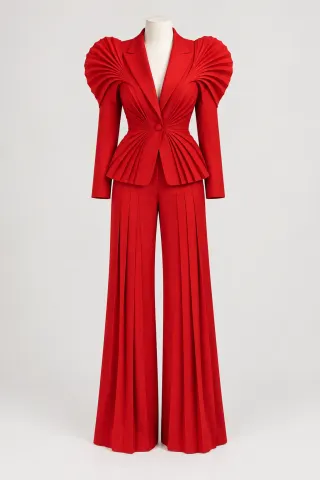
Example request · Look 01change her tracksuit to this sculptural scarlet suit
AI CLOTHES CHANGER FOR VIDEO
Upload your clip, optionally add a garment photo, and review the credit cost before generating your edit.
Paid editing · MP4 or MOV · 2–60 seconds · Review credits before generating.
One dance. Ten different looks.
Ten separate Aisma edits of one dance, brought together here. Choose a look to watch its full video.
Example request · Look 01change her tracksuit to this sculptural scarlet suit
What stays
What changes
What you bring
Your video + a written request + an optional garment photo
WHAT IT DOES
Aisma is an AI video clothes changer for clips you already shot. Upload a video of 2 to 60 seconds, add a photo of the garment or describe it in words, and Aisma puts the new outfit on the person across the whole clip. The person’s face and movement stay as filmed, and so does your audio.
NO PHOTO NEEDED
A man on a terrace at sunset, 10 seconds long. Both jackets came from a written request, with no garment photo.

Black leather.change his linen jacket to a black leather jacket
UP CLOSE
Every dance look in the reel came from a single run; none was redone. Here is what to watch for in four of the edits. More outfit edits are on the examples page, and the scarlet suit look has its own page, with the brief we sent.
Look 02 · Disco silver
Example request
change her tracksuit to this silver fringe jumpsuit
Metallic fringe hangs from the sleeves and legs and swings with her arms. On wide steps, the fringe at the hem covers her sneakers.
Look 04 · Emerald shimmer
Example request
change her tracksuit to this emerald sequin gown
Her arms and turns follow the original dance. The floor-length hem hides most of the footwork, which is what a gown that long would do.
Look 09 · Checker race
Example request
change her tracksuit to a black-and-white checker racing outfit
No photo here: the racing jacket and the black cargo pants came from words alone. Aisma also added sponsor-style patches and lettering on the chest. Small text and logos like these can appear on new clothes, so check them before a clip goes into an ad.
Terrace · Black tie
Example request
change his linen jacket to a white tuxedo with a bow tie
The dinner jacket picks up the same warm sunset light the linen had, and a buttoned dress shirt with a bow tie replaces the open collar. The face and the sea view behind him stay as they were.
HOW IT WORKS
An MP4 or MOV clip of 2–60 seconds, up to 500 MB. Pick a shot that shows the whole outfit.
Name the new clothes in a sentence, or add a garment photo and refer to it as Photo 1.
Pick 720p or 1080p and check the price. Edits take minutes, and the result arrives in your private Library.
REQUESTS TO TRY
Name the piece that changes and what it becomes, then add anything that must stay. For more on wording, see editing with a prompt.
Etsy shop, new colorway
make her sweater forest green and keep the same knit
Shopify store, product on a model
put the denim jacket from Photo 1 on him and keep his white T-shirt
Real estate agent’s listing intro
change his polo to a navy blazer over a light blue shirt
Wedding toast
change his gray suit to a black tuxedo with a bow tie
Thanksgiving dinner
change his hoodie to a cream cable-knit sweater
Halloween party
turn her jacket and jeans into a witch costume: a long black dress and a velvet cape
Outfit reveal for TikTok or Reels
change her outfit to the one in Photo 1 from 0:04 to the end
Step by step: how to change clothes in a video from a garment photo, and how to change a shirt color with words alone.
WHAT IT COSTS
A FEW GOOD QUESTIONS
No. Describe the clothes in words and Aisma works from that: two of the ten dance looks and both terrace jackets were made without a photo. Add one when a specific piece matters, like the jacket you sell, and call it “Photo 1” in your request.
The whole piece in focus on a plain background: a flat lay, a hanger shot or a dress form. The photo behind Look 01 is the scarlet suit on a dress form against a plain light backdrop. A photo of someone wearing it works too; add “use only the outfit from Photo 1” so Aisma takes the clothes and leaves the person. Our step-by-step guide shows one turn in four looks, each from a single garment photo.
Yes. A request like “make her T-shirt bright red” is enough, and a color change needs no photo. If the shirt has a print or a logo, say whether it should stay, then check it in the result.
Clips where the whole outfit stays in view under steady light. The dance above is a good model: one 15-second take, a camera that doesn’t move, a bright room and the dancer visible from head to sneakers the whole time. When you film for an outfit change, step back far enough to show the full garment and keep arms and bags from covering it for long. If you’d also like a new setting, change the background in a second edit.
Yes. The face, hair, steps and turns follow your clip, and the camera moves the way it did. The new clothes change what you see of the body: the floor-length gowns in Looks 04 and 08 hide the footwork. In fast arm moves, a hand can land slightly differently from the original for a moment. To replace the whole person instead, use video face swap.
Yes. Add a photo for each outfit and say who gets which, for example “put the suit from Photo 1 on the man on the left and the dress from Photo 2 on the woman.” On the web, Aisma may ask a quick question before it renders when a photo could go with either person. Use clips of people who agreed to the edit.
Yes. Say when, for example “change her outfit to the one in Photo 1 from 0:04 to the end.” Before that moment, the original outfit stays as filmed.
Your clip can run from 2 to 60 seconds and be up to 500 MB, as an MP4 or MOV file; vertical, square and horizontal all work. You get back an MP4 with the same length, framing and audio, in 720p or 1080p. For a longer video, edit it in parts of up to 60 seconds. Longer clips are on our roadmap.
It shows how the outfit looks on the person in your clip as they move. It’s a visual edit, so it doesn’t measure the body or suggest a size. If you sell clothes, compare the result with the real product before you post it.
Aisma works on video, where the new outfit has to hold up across every frame of a moving clip. Outfit changes for still photos are on our roadmap. If you need them for your shop or your feed, tell us what you’d make at support@aisma.ai.
Yes. All ten dance looks and both terrace jackets are real Aisma edits of the clips shown with them, and every look plays in full under Full Aisma edit. Before → After views and All 10 looks show the original and the edit at the same moment of the clip, never cropped, sped up or retouched. Your result depends on your clip and request.
Updated
YOUR NEXT EDIT STARTS HERE
Paid editing · MP4 or MOV · 2–60 seconds · Review credits before generating.