 aisma
aisma
Real Aisma edit
Tracksuit to scarlet suit.
One real Aisma edit, shown against its original. Full Aisma edit plays all 15 seconds.
Example requestchange her tracksuit to this sculptural scarlet suit
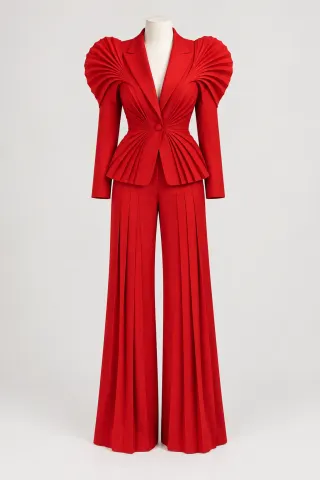
Aisma, an AI video editor for clips you’ve already shot, swapped the gray tracksuit in this 15-second dance for the red suit in one garment photo. The dancer and her steps stayed as they were, down to her braids and white sneakers. Below is the exact brief we sent, followed by the details worth a closer look.
Paid editing · MP4 or MOV · 2–60 seconds · Review credits before generating.
Tracksuit to scarlet suit.
One real Aisma edit, shown against its original. Full Aisma edit plays all 15 seconds.
Example requestchange her tracksuit to this sculptural scarlet suit
What stays
What changes
What you bring
A 15-second clip + one garment photo + the brief below
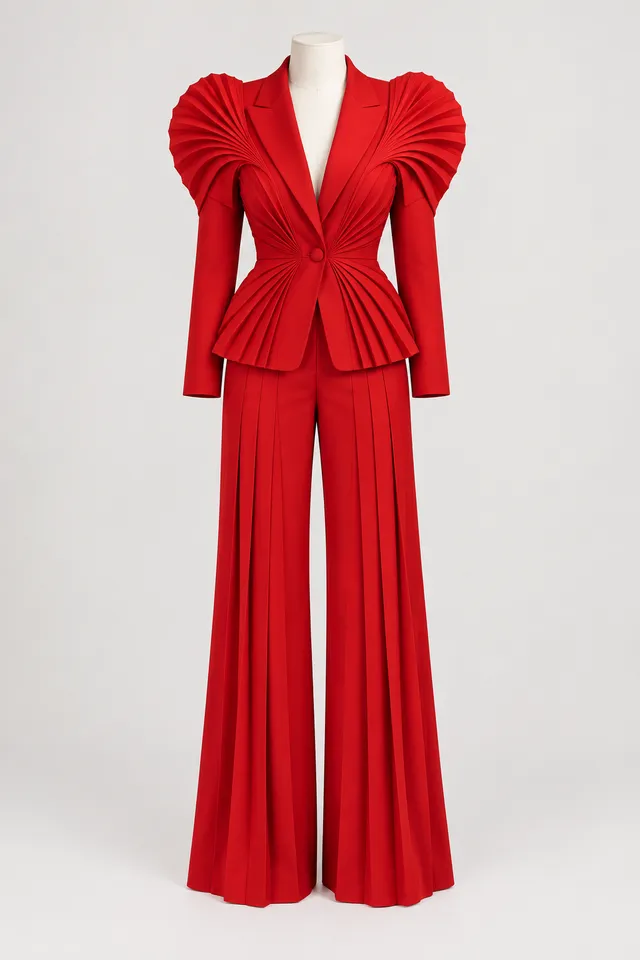
The example request under the player puts this edit in everyday words. Here is the brief we actually sent, next to the garment photo it calls Photo 1.
It opens with the swap itself: the gray tracksuit out, the scarlet suit from the photo in. Then comes a keep list, from her face and hairstyle down to the white sneakers, and one last line asking the new fabric to move with the dance. Keep that order and put your own clothes and keep list into it.
We sent it once in September 2026 and kept that first result. The brief never mentions the dress form in the photo, and the edit shows the suit without it.
Try it on your videoThe brief we sent, word for word
Replace the dancer's grey tracksuit with the sculptural scarlet-red pantsuit with pleated architectural shoulders shown in Photo 1. Keep the same woman, face, hairstyle, dance movements, body position, room, camera and white sneakers. Make the new clothing move naturally with her dance.
15 seconds · 720p · one garment photo · sent once
Up close
The shoulders
The pleated fans from Photo 1 sit on both shoulders and keep their shape when she raises her arms overhead, about ten seconds in.
The frame edges
In her widest arm sweeps, her fingertips leave the frame. They leave it in the original as well, since the edit keeps the original framing.
The shoes
Her white sneakers come from the original clip. The new pant legs are wide and long, so the hems now reach the tops of her shoes.
For an outfit change of your own, film from far enough back that the whole outfit stays in view, and keep bags and folded arms off the clothes for most of the clip. This dance is a good model: she stays in frame from head to sneakers for nearly all 15 seconds.
Make it yours
Ideas to adapt for clips you already have. They aren’t results shown on this page; change the clothes and the photo numbers to fit your video.
Etsy dress shop
Change her denim jacket and jeans to the linen dress in Photo 1. Keep her face and the turn at the end.
Prom night
Change his gray hoodie to the black tuxedo in Photo 1, with a white shirt and a bow tie. Keep the dance and the room.
Real estate intro
Change my polo shirt to the navy blazer in Photo 1. Keep my face and the kitchen behind me.
Game day
Change his white T-shirt to the team jersey in Photo 1. Keep the bleachers and the people around him.
No photo at all
Make her T-shirt bright red. Keep everything else as filmed.
Holiday card
Change his sweater to a red holiday sweater with white snowflakes. Keep his face and the tree behind him.
Two people in one clip? Say who gets which photo, like “Photo 2 goes on the woman in the middle.” If a photo could belong to either person, Aisma on the web may check with you in a quick question first.
HOW IT WORKS
MP4 or MOV, 2–60 seconds, up to 500 MB. Your original framing is kept.
Say which clothes go and which photo replaces them, then name what stays.
Pick 720p or 1080p. Aisma shows the credits first, and the finished edit arrives in your private Library.
A FEW GOOD QUESTIONS
Yes. Aisma made it from the brief and the garment photo above, and we kept that first result. Before → After wipes from the original to the edit at the same moment of the dance; Full Aisma edit plays the complete 15-second file. The dancer is a fictional adult, and the original clip was created for this demonstration.
No. You can also use a hanger shot or a flat lay, as long as the whole piece is in the picture against a plain background. Photo 1 here is a dress form shot, and the edit took the suit and left the form out. If your photo shows someone wearing the piece, add a line such as “take only the clothes from Photo 1.”
Yes. Words are enough when no exact garment has to match. The terrace example on our outfit page changed a linen jacket to black leather from the request “change his linen jacket to a black leather jacket,” with no photo at all. Add a photo when the piece is specific, such as something you sell.
At 8 credits a second for 720p and 16 for 1080p, a single 15-second shot like this dance costs 120 credits, or 240 in 1080p. Aisma counts each shot in whole seconds, so a clip full of quick cuts adds a little. The exact number is on the Generate button before you press it. Packs and weekly plans are on our pricing page.
No. It shows the suit on the woman in this clip while she dances. It isn’t a size or fit prediction, so compare the real garment before you use an edit like this in a shop listing.
Use Edit a clip on the finished result to redo that part with a clarification, such as “keep the jacket buttoned.” Aisma shows that part’s price before it runs, and you aren’t charged for a part that fails.
Updated
More examples
YOUR NEXT EDIT STARTS HERE
Paid editing · MP4 or MOV · 2–60 seconds · Review credits before generating.