 aisma
aisma
Real Aisma edit · Previous version
One clip. Three directions.
Example requestchange the apartment to a greenhouse in space with earth outside the window
VIDEO TO VIDEO AI
Video to video AI, guided by one prompt. Ask for a new outfit, a new world or a painted scene, and describe the details you want to keep.
Paid editing · MP4 or MOV · 2–60 seconds · Review credits before generating.
One clip. Three directions.
Example requestchange the apartment to a greenhouse in space with earth outside the window
AT A GLANCE
Video to video AI edits footage you already shot instead of inventing a clip from text. In Aisma, you upload a 2–60 second video, describe the change in plain words and add up to 10 photos if a specific look matters. Your framing and original audio stay as they were, and the motion comes from your take.
Updated
What stays
What changes
What you bring
A 2–60 second clip, a sentence or two, and photos if a look matters
WHEN A PHOTO HELPS
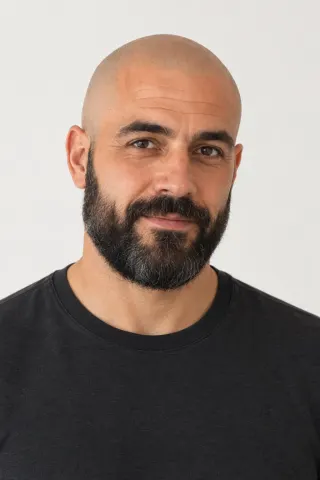
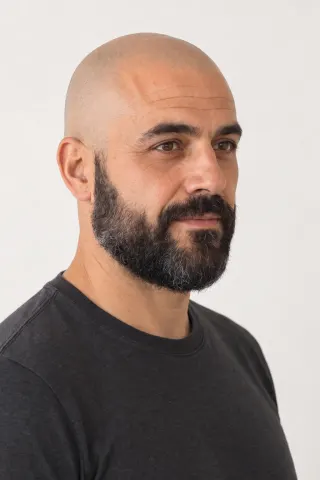
Two of the three edits at the top used words alone; the blue suit came from one photo of a suit on a dress form. Below, two portraits put a different cook at the same stove, and one product photo puts a new shoe on the same step.

Bald, bearded, same stir.swap the cook for the man in the photos

Architecture, one step.change the sneaker to the one in the photo
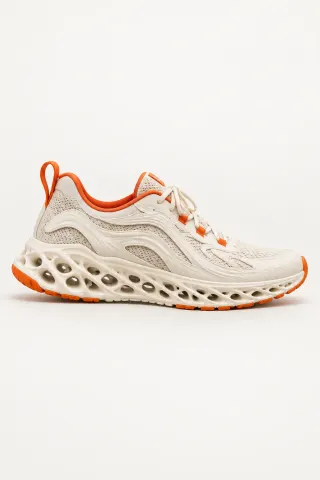
Examples marked Previous version were recorded with a previous version of Aisma. Results vary with your clip and request.
BEFORE AND AFTER, IN WORDS
All four clips are 10 seconds long and were recorded with an earlier version of Aisma. More real edits with their requests are in the examples library.
| Clip | Example request | Photos | What changed | What stayed as filmed | Tries |
|---|---|---|---|---|---|
| A woman in a gray sweatshirt carries a box across a room | put her in the blue suit from the photo | 1 photo: a cobalt suit on a dress form | Her sweatshirt and pants became a cobalt suit over a white T-shirt | Her face, hair and walk, the box, the room and the camera | 1 |
| The same clip | change the apartment to a greenhouse in space with earth outside the window | No photos | The room became a greenhouse on a space station, with Earth outside the glass and cooler light on her | Her walk, the box, the small table and the camera path | 2: the first, longer request stopped before rendering and was refunded |
| A cook in a beige apron stirs a pot and glances at the camera | swap the cook for the woman in the photos | 2 portraits: front and three-quarter | The cook became the woman from the photos, a fictional person about 60 with a silver bob; her shirt came out charcoal, like the portraits | The apron, the stir, the spoon, the glance, the kitchen and the camera | 1 |
| A foot in a gray sneaker steps down and pivots on the heel | put the black trail shoe from the photo on him | 1 photo: the shoe | A black trail-running shoe with a neon-green sole and a consistent shadow where it touches the floor | The step and pivot, the pant leg, the floor and the light | 1 |
One habit worth copying: if the people in your photos wear something different, say which clothes stay. Nobody mentioned the cook’s shirt, and it came out like the one in the portraits.
WHAT YOU CAN ASK FOR
Frames from real Aisma edits. Some were recorded with a previous version of Aisma.
REQUESTS TO BORROW
Copy one and change the details to match your clip. Your audio stays as recorded, so the toast still sounds like the toast.
Three of these are outfit changes; the clothes changer shows ten looks on a single dance.
THREE WAYS TO MAKE AN AI VIDEO
| Video to video | Text to video | Photo to video | |
|---|---|---|---|
| You start with | A clip you already shot | A written description | One still image |
| The motion comes from | Your take: the real movement, timing and camera | Your description | Your description, starting from the photo |
| The people and the place | The ones you filmed, until you ask for a change | Whatever the description calls for | The ones in the photo |
| Good for | Changing one thing in a moment you captured | Scenes you never filmed | Putting a single picture in motion |
Aisma works the first way: it edits video you already shot. No footage yet? A short clip from your phone is enough to start, and our step-by-step guide follows one real edit from upload to result.
HOW IT WORKS
MP4 or MOV, 2–60 seconds, up to 500 MB. Your original framing is kept.
One sentence for each is plenty. Add up to 10 photos when it has to be a specific garment, face or product.
Pick 720p or 1080p. Aisma shows the credits first, and the finished edit arrives in your private Library.
WHAT IT COSTS
A FEW GOOD QUESTIONS
Remove a stranger or a trash can, change an outfit or just its color, swap a face or a whole person using two portraits of someone who agreed to it, replace a product with the one in your photo, move the scene somewhere new, change the weather or light, restyle the look or add a physical effect. It all goes through one request box, and you can set the timing, as in “from 0:05 to 0:12.”
Clips can run 2–60 seconds and up to 500 MB, as an MP4 or MOV file. Vertical, square and horizontal clips all work, and so do clips with several shots. Rendering takes minutes, longer for longer clips, and the task page shows progress until the edit lands in your Library. For anything over a minute, edit it in parts of up to 60 seconds.
Yes. The edit comes back as an MP4 with the same length and framing as your clip, nothing cropped, and with your original audio. The picture changes and the sound doesn’t, so a toast or a voiceover stays as recorded. You pick 720p or 1080p before you generate.
An edit costs 8 credits per second at 720p and 16 at 1080p, so a 10-second clip filmed in one shot costs 80 or 160 credits. You see the exact price before you press Generate, and unused credits come back. Clips with many quick cuts cost a little more, because each shot counts in whole seconds, with a 2-second minimum. Credit packs start at $1.99 for 100 credits, and weekly plans at $9.99 for 1,000 credits a week. Packs and weekly plans are listed on the pricing page.
Add them when the result has to look like something specific: a certain jacket, your product or a person who agreed to appear. Places, weather, materials, effects and removals work from words alone; two of the three edits at the top of this page used no photos. Attach up to 10 and call them Photo 1, Photo 2 and so on.
Put the change in one sentence and what must stay in a second. Describe people and things by look and position, like “the woman in the yellow raincoat on the left.” Be exact about what has to survive: in one of our kitchen clips, the man’s royal-blue T-shirt changed color on the first run although we’d asked to keep it, and naming the exact shade fixed it on the second. Our guide to editing with a prompt has more examples.
Steady, well-lit footage where the thing you want to change is easy to see. The box clip at the top is a good model: ten seconds, one person, a bright room, the whole outfit in frame. Changing one thing, like an outfit or an object, is the most predictable. Looks that repaint the whole frame vary more: our watercolor took two runs, because carved wood, our first idea, came back looking like a smooth toy figure.
Yes, on the web. A new account can prepare its first three edits before paying: Aisma studies your clip and may ask a couple of quick questions. Buy credits and the prepared edit starts on its own. Rendering a video always uses credits.
Aisma edits footage you already shot: you bring the clip, and it changes what you describe. Creating new videos from text or a single photo is on our roadmap. If that’s what you need, write to support@aisma.ai and tell us what you’d make with it; requests like yours help us decide what to build first.
Open the result and choose Edit a clip to redo just that part with a clarification. Aisma shows that part’s price before it runs. You aren’t charged for a part that fails or doesn’t pass the automatic safety check, and you can also recreate the whole edit from your Library with a different request.
Yes, your uploads and results are private to your account. Without an active weekly plan, a finished edit stays in your Library for 72 hours, so save the file to your device; with a plan, the Library stays while the plan is active and for 72 hours after it ends. The examples on this website were made separately for public use.
Yes. The box clip in all three directions, the cook and the sneaker are real Aisma edits of the originals shown with them, and Full Aisma edit plays each one from start to finish. Examples marked Previous version were recorded with a previous version of Aisma. Before → After views show the original and the edit at the same moment of the clip, never cropped, sped up or retouched. Your result depends on your clip and request.
YOUR NEXT EDIT STARTS HERE
Paid editing · MP4 or MOV · 2–60 seconds · Review credits before generating.