 aisma
aisma
Real Aisma edit
One performance. Three leads.
Example requestreplace the man with the guy from the photos
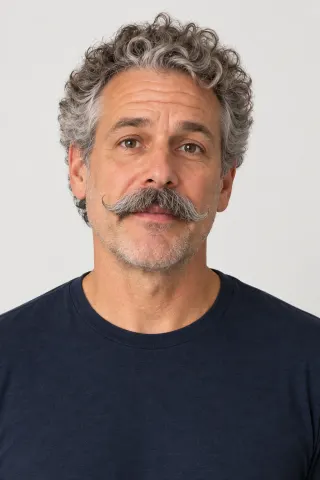
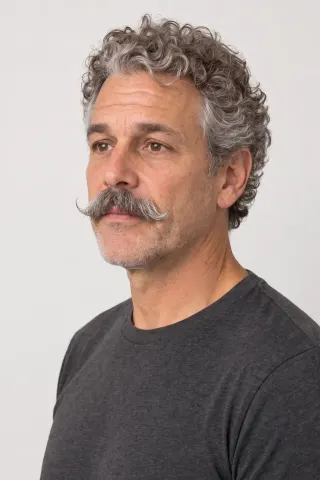
AI VIDEO FACE SWAP
Replace the person in your video with two portrait photos and one written request. In these examples the gestures, the setting and the camera movement stay.
Paid editing · MP4 or MOV · 2–60 seconds · Review credits before generating.
One performance. Three leads.
Example requestreplace the man with the guy from the photos
THE SHORT ANSWER
An AI video face swap puts a different person into a clip you already filmed. In Aisma, you upload a 2–60 second video with photos of the new person and write one line saying who they replace. The new face and hair come from your photos; the gestures, setting, camera move and original audio stay as filmed.
What stays
What changes
What you bring
Your video + two photos of the new person + one written line
MORE FACE SWAPS
A cook at the stove and a man on a seaside terrace. The stir, the spoon, the apron and the linen jacket stayed as they were in the original.

Bald, bearded, same stir.swap the cook for the man in the photos
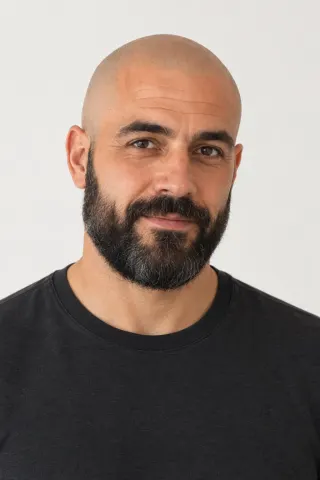
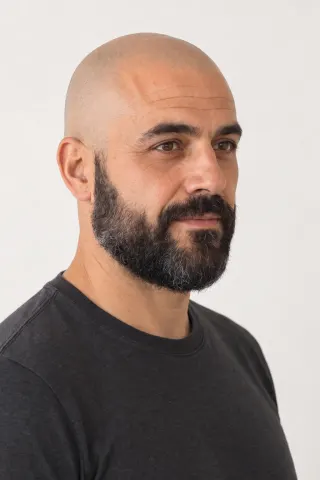

replace the guy with the person from my photos
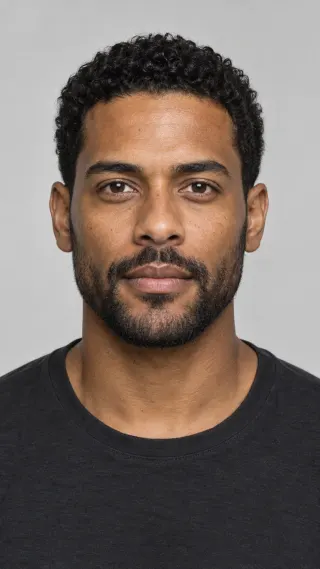
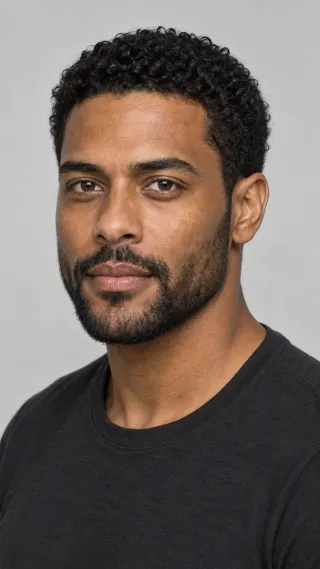
Examples marked Previous version were recorded with a previous version of Aisma. Results vary with your clip and request.
FROM OUR RUNS
The examples show each request in short form. Here’s how many runs each take needed, and what changed. More real requests are in the examples gallery.
September 28, 2026 · 10-second clip · 720p · 5 runs, 3 kept
The first runs for the veteran and the rookie came back with the blue T-shirt in another color. Once the request named it exactly, “bright royal-blue crew-neck T-shirt,” both reruns kept it. The newcomer’s photos showed a charcoal T-shirt, and she wears it in her first run; we kept that take.
Previous version · September 13, 2026 · 10-second clip · 1080p · 2 runs, 2 kept
Both takes came from the first run. The apron and the stir stayed in each; the shirt wasn’t named, and in the silver-bob take it became the charcoal T-shirt from her photos.
Previous version · September 8, 2026 · 10-second clip · 1080p · 1 run
One run. The request asked to keep his clothing, and the linen jacket stayed, though his photos show a black T-shirt.
BEFORE YOU UPLOAD
One front view, one three-quarter view.
Sharp, evenly lit, no sunglasses.
Just that person: no groups, no filters.
WRITE IT LIKE THIS
Requests for your own footage. Each one assumes the person in the photos agreed to it.
Shopify or Etsy shop · one demo, a version for each co-owner
Replace the man at the counter with the woman in Photos 1 and 2. Keep his black apron and the cold brew jar.
Real estate · the listing agent on camera
Replace the man walking through the kitchen with the person in Photos 1 and 2. Keep the navy blazer and the camera move.
Indie short film · a stand-in shot
Replace the stand-in at the diner counter with the actor in Photos 1 to 3. Keep the red varsity jacket.
Two people in one clip
Replace the man on the left with Photos 1 and 2, and the woman on the right with Photos 3 and 4. Keep their outfits.
Fitness channel · your co-coach’s version
Swap the trainer for the woman in Photos 1 and 2. Keep the gray tank top and the kettlebell.
Birthday video · a friend as the lead
Replace the woman walking toward the camera with my friend in Photos 1 and 2. Keep the yellow dress.
HOW IT WORKS
MP4 or MOV, 2–60 seconds, up to 500 MB. Your original framing is kept.
Two photos of the same person, then one line such as “replace the man with the person from the photos.” Add a second line for clothes that must stay.
Pick 720p or 1080p. Aisma shows the credits first, and the finished edit arrives in your private Library.
WHAT IT COSTS
A FEW GOOD QUESTIONS
The hair too. In every swap on this page the face, hair, skin tone and facial hair came from the portraits, down to the veteran’s gray mustache. Gestures, head turns and the cook’s stir stay as performed.
Yes, when your request names them precisely. Clothes in your photos can come along with the face: the newcomer’s request asked to keep the blue T-shirt, and she still wears the charcoal one from her photos. Naming the shirt exactly, “bright royal-blue crew-neck T-shirt,” kept it blue for the veteran and the rookie. To keep the person and change just the outfit, use the clothes changer.
No. Aisma keeps the audio you recorded, so the new person talks with the original voice. A new voice to match the face is on our roadmap; if your project needs one, write to support@aisma.ai and tell us what you’re making.
Upload the clip with two photos of the new person and write the request, for example “Replace the man with the person in Photos 1 and 2. Keep his royal-blue crew-neck T-shirt.” Choose 720p or 1080p, check the credits and press Generate. It works in the browser and in the iPhone and Android apps. More wording tips are on the edit with a prompt page.
Clips where the face is easy to see. The kitchen take at the top of this page is a good model: one continuous 10-second shot, a man talking to the camera from about arm’s length, his face in view the whole time. Start there before you try a crowd or a face that turns away.
Any clip of 2–60 seconds and up to 500 MB, as an MP4 or MOV file. The swap comes back at the same length and framing, in 720p or 1080p. For a longer video, swap it in parts of up to 60 seconds; longer clips are on our roadmap.
Yes. Add photos for each person and say who goes where, for example “Replace the man on the left with Photos 1 and 2, and the woman with Photos 3 and 4.” On the web, Aisma may ask which photo goes with whom before it renders. One person per request gives the most predictable result. To take someone out of the shot instead, see how to remove people from a video.
Minutes. A longer clip takes longer, and the task page shows progress until the swap appears in your Library.
Aisma is paid with credits. The price depends on the clip’s length and the quality you pick, and Aisma shows the exact number before you press Generate; a part that fails or doesn’t pass the safety check isn’t charged. On the web, a new account can prepare its first three edits before buying credits. Rendering uses credits. Credit packs and weekly plans are on the pricing page.
Your own, or photos of someone who agreed to it. Aisma is for footage and photos you own or have permission to use, so swaps with a celebrity’s or a stranger’s face, or ones meant to fool people, aren’t something Aisma offers.
Your clip, your photos and the result are private to your account and open through short-lived links. Without an active weekly plan, a finished edit stays in your Library for 72 hours, so save it to your device; you can delete any task at any time. The examples on this page were made separately for public use.
Yes. The kitchen talk, the cook at the stove and the man on the terrace are real Aisma edits of the takes shown with them, and Full Aisma edit plays each swap whole. Examples marked Previous version were recorded with a previous version of Aisma. Before → After views show the original and the edit at the same moment of the clip, never cropped, sped up or retouched. Your result depends on your clip and request.
Updated
YOUR NEXT EDIT STARTS HERE
Paid editing · MP4 or MOV · 2–60 seconds · Review credits before generating.